Showing the Time Each Layer of Your Docker Image Build Takes
How to find out how long your Docker image build takes for each layer?
Measuring the total build time is quite straightforward - just add time in front of your docker build command.
You also don’t have to sit there with a stop-watch to time your layers. Here’s a simple way to get the time each layer you build:
Use the BuildKit buildx Command
BuildKit brings along a few useful features you can use out of the box starting with Docker 18.06.
It’s an alternative build backend to create Docker images, which is not the default at the moment. You can make use of it to show the duration of each layer build without making any changes to your setup.
Open a terminal in the directory where your Dockerfile is located, and perform a build, but instead of your usual docker build command, run it with docker buildx build.
So instead of:
$ docker build -t imagename .
You can use the following command to run your build with BuildKit:
$ docker buildx build .
The CLI output will show you how long each layer took to build.
As the buildx build command requires a slightly different workflow, don’t expect to produce an image. However, you can use the time information to find out which layers are slowing your build down the most.
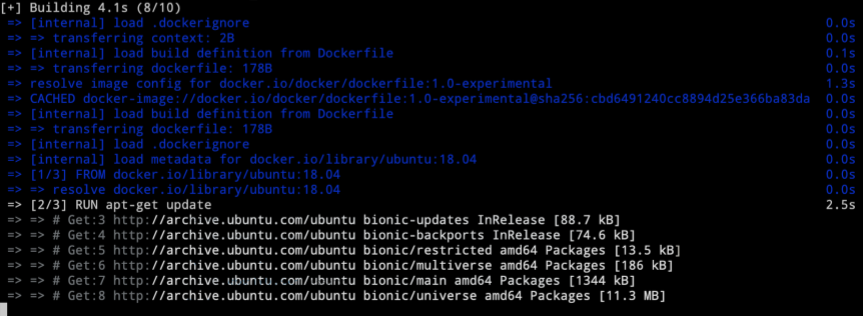 Sample intermediate BuildKit output.
A word from the author
Hi, I'm Vladislav. I work with small teams and bootstrapped founders who need to get their infrastructure right — reliable deployments, less operational risk, and systems that don't fall apart the moment the founder looks away. If that sounds like your situation, here's how we can work together.
I've been writing about Docker, deployment, and infrastructure since 2017. If you'd like to read more, the articles page is a good place to start — or you can sign up for the newsletter to get new pieces by email.